Enabling User Management with SAML 2.0 IDP Services
ThreatStream provides the capability to integrate with identity providers (IDP) that are compatible with the SAML 2.0 protocol, thus enabling single sign-on (SSO) and ThreatStream user administration from the preferred IDP.
Integration between a SAML 2.0 IDP and ThreatStream means that the IDP creates a SAML response to ThreatStream. The SAML response must contain an assertion with the group attribute name attribute. This attribute allows the mapping of permissions for group lists between the IDP and ThreatStream. You can view a sample of a SAML 2.0 assertion in Sample SAML 2.0 assertion with Group Attribute Name.
group attribute name attribute may be called differently depending on a preferred IDP.Requirements
-
You must have an active SAML 2.0 configuration on ThreatStream. Contact Anomali Support for assistance.
-
You must use a SAML 2.0-compliant IDP that supports exporting group lists as SAML attributes.
-
You must have a configured SAML group list mapping with the specified
group attribute nameattribute.
Enabling user management with SAML 2.0 IDP is a two-step process. It involves:
-
Configuring the integration in a SAML 2.0 IDP. See Configure the Integration in SAML 2.0 IDP.
-
Enabling the integration on ThreatStream. See Enable the integration on ThreatStream.
Configure the Integration in SAML 2.0 IDP
Configuring the integration in IDP involves creating groups corresponding to each permission in ThreatStream and one additional group which grants users access to ThreatStream. The table below lists all required permissions and the default group names recognized by ThreatStream. Groups can be given any name and mapped to their corresponding ThreatStream permission in a later step. However, if you use the default values, mapping is automatic.
| Default AD Group Name | ThreatStream Permission |
|---|---|
| SecGrp_TSAdminUser | Org Admin |
| SecGrp_TSAuditor | Can Audit |
| SecGrp_TSChangeRules | Can Use Rules |
| SecGrp_TSChatUser | Can Use Chat |
| SecGrp_TSCreateCommunityIntelUser | Create Anomali Community Intel |
| SecGrp_TSIntelApprover | Approve Intel |
| SecGrp_TSReadOnlyUser | Read Only Account |
| SecGrp_TSSubmitSandbox | Submit Sandbox |
| SecGrp_TSTaxiiUser | Import to TAXII Feeds |
|
SecGrp_TSUseMatch Note: You must configure the group for the Can use Security Analytics permission:
|
Can use Security Analytics |
|
SecGrp_TSUser Note: All users must be part of the SecGrp_TSUser group. |
ThreatStream User |
| SecGrp_TSViewAPIKeyUser | Show API Key for Users |
Create a group for each permission listed in the table above. The procedure for creating a group depends on your preferred IDP.
After creating each group, you can add desired permissions to each ThreatStream user in the IDP. These permissions will be synchronized to ThreatStream the next time the user logs in to ThreatStream.
When configuration in the IDP is complete, proceed to Enable the integration on ThreatStream to complete configuration within ThreatStream.
Enable the integration on ThreatStream
To finish configuring the integration, you must configure a Break Glass account and map the groups created in a SAML 2.0 IDP onto their corresponding permissions in ThreatStream.
To enable the integration on ThreatStream:
-
In the bottom-left corner of the side navigation panel, click
 > ThreatStream and then click SSO.
 -
Select a user who will serve as the Break Glass Account and click Update.
Notes:Only Org Admin users are available in the drop-down list.
The Break Glass Account should be an independent, local account on ThreatStream. Another account with the same configuration must not exist in the SSO IDP. Doing so will cause login failures. See Managing Organization Users to learn how to create a local account on ThreatStream.

- (Recommended) Enable the Use SSO for login exclusively if you want to prevent users from logging in through the ThreatStream login page.
-
Add an identity provider, as described in Configuring an Identity Provider for SSO.
-
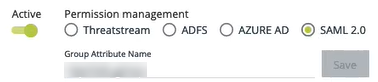
After the identity provider is configured, specify SAML 2.0 under Permission management.
-
In the Group Attribute Name field, specify the
group attribute namefrom your IDP group list configuration, and then click Save.Important: In order for the integration to work properly, make sure that thegroup attribute nameis the same both in ThreatStream and IDP. -
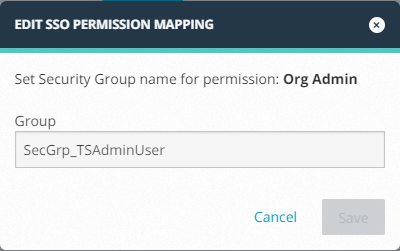
Specify the Group Name corresponding to each permission. If you used the default IDP Group Name values, the Group Names are automatically mapped to the correct permission. If you used non-default names, click the first permission in the list. Specify the correct Group Name in the Edit SSO Permission Mapping window and click Save.
Configuration is complete and your integration is now active.
Sample SAML 2.0 assertion with Group Attribute Name
Below is a sample SAML 2.0 assertion where the group attribute name is called name, its value is "IDP_group", and the user has a membership in the following groups: SecGrp_TSAdminUser, SecGrp_TSSubmitSandbox, SecGrp_TSUser, and SecGrp_TSViewAPIKeyUser.
You can use this sample to compare it against the SAML 2.0 assertion in your preferred IDP and check how the group attribute name is called.
<saml:Attribute FriendlyName="group list"
Name="IDP_group"
NameFormat="urn:oasis:names:tc:SAML:2.0:attrname-format:basic"
>
<saml:AttributeValue xmlns:xs="http://www.w3.org/2001/XMLSchema"
xmlns:xsi="http://www.w3.org/2001/XMLSchema-instance"
xsi:type="xs:string"
>SecGrp_TSAdminUser</saml:AttributeValue>
<saml:AttributeValue xmlns:xs="http://www.w3.org/2001/XMLSchema"
xmlns:xsi="http://www.w3.org/2001/XMLSchema-instance"
xsi:type="xs:string"
>SecGrp_TSSubmitSandbox</saml:AttributeValue>
<saml:AttributeValue xmlns:xs="http://www.w3.org/2001/XMLSchema"
xmlns:xsi="http://www.w3.org/2001/XMLSchema-instance"
xsi:type="xs:string"
>SecGrp_TSUser</saml:AttributeValue>
<saml:AttributeValue xmlns:xs="http://www.w3.org/2001/XMLSchema"
xmlns:xsi="http://www.w3.org/2001/XMLSchema-instance"
xsi:type="xs:string"
>SecGrp_TSViewAPIKeyUser
</saml:AttributeValue>
</saml:Attribute>